



UI / UX Kiosk Designing Solution
XIPHIAS
UI / UX KIOSK DESIGNING
XIPHIAS specializes in delivering UI / UX Kiosk designs that are visually appealing and highly functional across multiple sectors. Kiosk UI/UX covers layout, graphics, and interactive flows with a strong focus on overall user experience. With a user-centric approach and easy-to-use interfaces, our UI/UX designs give any self-service kiosk a clear edge in service delivery and user satisfaction.
Our designers and developers blend aesthetics, usability, and user‑centric principles to create engaging kiosk experiences. Whether you need a self-service kiosk, information kiosk, or interactive display, we craft interfaces that attract users and support seamless interactions. Trust XIPHIAS to deliver kiosk designs that improve satisfaction, streamline operations, and leave a lasting impression.

UI / UX Kiosk Designing
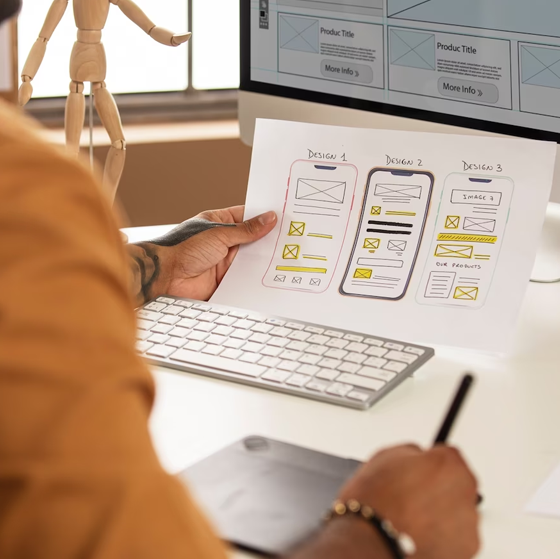
At XIPHIAS, UI / UX is central to how self-service kiosks deliver services. Our UI / UX kiosk designs aim for seamless, engaging experiences so users can complete tasks quickly and confidently.
The team applies user-centric principles, clear navigation, consistent design, and meaningful interactions to every workflow.
From user‑centric flows and concise information to responsive layouts and usability testing, our designs elevate both experience and functionality.

Key Advantages of UI / UX Kiosk Design
Explore how thoughtful kiosk UI / UX impacts engagement, brand perception and operational efficiency.
UI/UX kiosk design focuses on intuitive layouts and appealing visuals. Simple navigation and interactive elements encourage users to explore, boosting engagement and kiosk usage.
A cohesive, on‑brand interface reinforces your visual identity. Consistent colours, typography and styling improve recognition and build user trust.
Clear flows and concise screens help users find information and complete tasks quickly. This reduces confusion, errors and drop‑offs at the kiosk.
A smooth, hassle‑free interaction leaves a positive impression. When kiosks feel easy and reliable, customers are more likely to return and recommend the service.
Instrumented UI/UX captures interaction patterns and preferences. These insights guide design improvements and support better business decisions.
Self‑service kiosks reduce dependency on staff. Effective UI/UX lowers user errors and support needs, cutting operational costs.
Flexible UI/UX patterns make it easy to add new services or update flows. This keeps kiosk solutions relevant as business needs change.
Technology we use!

HTML

CSS

Adobe Photoshop

Adobe Illustrator

Adobe Dreamweaver

Adobe XD

Sketch

